A good fit if
You want a wallet that works with your phone and also displays selected NFT artwork on its own screen. Nifty combines a 2.8-inch touchscreen with a dark-grey and white plastic body.


A phone-based hardware wallet with a 2.8-inch touchscreen, NFT artwork gallery and dark-grey and white plastic body.

Approve transactions with
Backup
Recovery phrase
Power
Rechargeable battery
Is it right for you?
You want a wallet that works with your phone and also displays selected NFT artwork on its own screen. Nifty combines a 2.8-inch touchscreen with a dark-grey and white plastic body.
You will not use the artwork gallery: NeoGold has the same screen size and phone app without it. Compare Neo-X if you prefer an aluminium body, or V20 if you need wired computer signing as well as phone use.
An aluminium body with an artwork gallery, the same screen size and phone app, and a package listing two X-SEED sheets and an engraving pen.
Compare Nifty and Neo-XThe same screen size and phone app if you do not need artwork displayed on the device.
Compare Nifty and NeoGoldFor wired computer signing as well as phone use, with a touchscreen and USB-C.
Compare Nifty and SecuX V20Phones and computers
Check the app and connection for each device. Setup and transaction signing are confirmed separately.
Bluetooth
Bluetooth
Nifty works with SecuX Wallet on iPhone or Android over Bluetooth. USB-C charges the device; transactions use the phone app, rather than the SecuXess computer workflow available on V20 and W20.
Prepare the transfer in the app, review the recipient address and amount on Nifty’s touchscreen, then confirm it on the device. Return to the app to send it.
The iPhone app requires iOS 13 or later. SecuX’s published Android minimums conflict, and the current public Google Play listing does not establish the requirement. If you have an older Android phone, check that you can install SecuX Wallet before buying Nifty.
Official guidance
Add artwork to Favorites in SecuX Wallet, then sync it to Nifty over Bluetooth. Its gallery lets you browse those selected images on the device. An image in the gallery does not prove NFT ownership; transfers still need their own transaction review and confirmation.
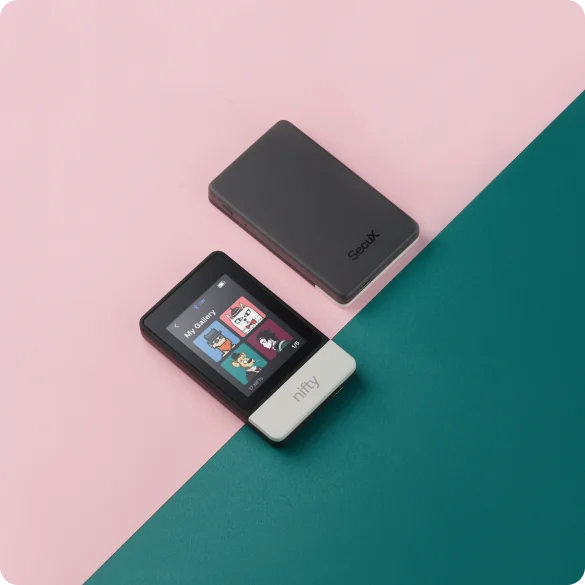
Nifty supports Bitcoin and Ethereum transfers in SecuX Wallet. Its documented NFT networks are Ethereum, Polygon, BNB Smart Chain and Solana. Choose according to the network your NFT or token actually uses, not only the name of the collection or token.
For USDT or USDC, select the receiving network in the app and match it to your exchange’s withdrawal network. Verify on device displays the receiving address on Nifty so you can compare it with the app’s address before transferring.
SecuX’s April 2025 model breakdown describes Nifty support for up to ten Ethereum-compatible networks, including Base, Arbitrum and Avalanche. For V20 and W20, it also documents adding tokens manually on other Ethereum-compatible networks. Check the mobile column in SecuX’s supported-assets list for your exact coin, token and network.
Official guidance
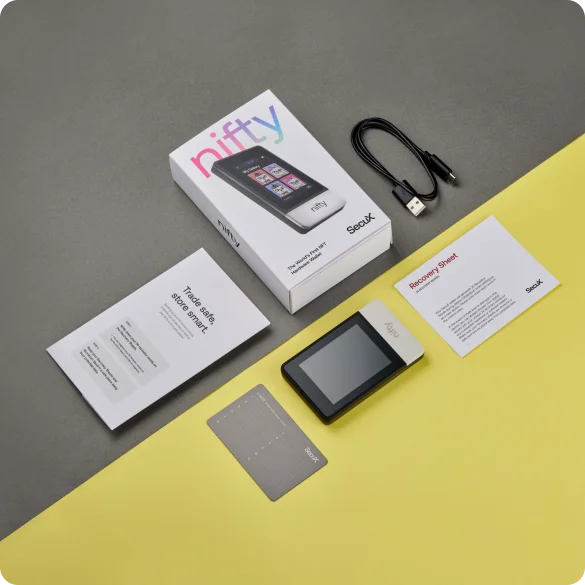
For a new wallet, Nifty generates 24 recovery words on the device and asks you to confirm them there. The global SecuX store lists one aluminium seed-backup sheet and two paper recovery sheets in the package. Record the words yourself and keep the backup offline, separate from the wallet.
SecuX’s older Nifty manual describes restoring a wallet by entering a compatible 12-, 18- or 24-word recovery phrase on the device. For an existing backup, compatibility also depends on its recovery-phrase format and support for the accounts and networks you use.
SecuX lists no support for an additional recovery passphrase on Nifty. If your existing wallet uses one, choose a replacement that supports it.
The device PIN unlocks Nifty; the recovery words are your wallet backup. Seed Check in the device settings lets you check the written words while Nifty is working, without a factory reset.
Official guidance
SecuX Wallet checks Nifty’s firmware and installs updates over Bluetooth. Connect the powered-on wallet in the app, check for an update and keep the update screen open until the process finishes.
SecuX recommends an external power source during updates. Keep Nifty powered and the Bluetooth connection active; turning off the device or closing the app interrupts the update.
Official guidance
Choose Nifty if you want the artwork gallery and prefer its dark-grey and white plastic body. Neo-X also has a gallery and the same screen size, with an aluminium body and a package listing two X-SEED sheets and an engraving pen. If artwork display is unnecessary, NeoGold keeps the same phone app and screen size without a device gallery.
| Detail | Value |
|---|---|
| DisplayDisplay type | LCD |
| Screen diagonal | 2.8″ |
| Colour mode | Colour |
| Size and weightDimensions | 100 × 60 × 12 mmDimensions as listed by the manufacturer |
| Device weight | Sources disagree |
| Power and chargingBattery | Rechargeable |
| Battery life | 7 hr in use |
| Battery capacity | 600 mAh |
| Charging methods | USB-C |
| Materials and finishMaterials | Plastic |
| Colour | Dark grey / white |
| Device connectionsUSB port | USB-C |
| Bluetooth version | 5.0 |
| Security and softwareSecurity chip | Infineon SLE 97 · CC EAL5+ |
| ProcessorControllers | Nordic nRF52840 |
This page is based on manufacturer documentation.
Documentation checked: ·
How we compareSecuX Nifty


