
Choose Trezor Safe 5
You prefer Trezor Suite, a colour touchscreen and USB. You are not depending on this device to approve transactions from an iPhone.


Written comparison · Oct 5, 2026
Ledger Flex supports signing with an iPhone. Trezor Safe 5 connects by USB to a computer or supported Android phone. Both have touchscreens, so start with the device you will connect them to.
Safe 5 uses a colour touchscreen and USB. Flex has an E Ink touchscreen and Bluetooth, including iPhone support. Their apps and recovery formats also differ.
You prefer Trezor Suite, a colour touchscreen and USB. You are not depending on this device to approve transactions from an iPhone.

You want an E Ink touchscreen and Bluetooth for use with a phone. You prefer Ledger Wallet; some cryptocurrencies may need a compatible third-party app.
Flex signs with Ledger Wallet on iPhone over Bluetooth. Safe 5 uses Trezor Suite over USB with a computer or compatible Android phone; displaying a balance on iPhone does not give it iPhone signing.
On Android, both can fit: Safe 5 uses a data cable, while Flex offers USB or Bluetooth. Check the actual asset and network in the app you will use rather than assuming both apps offer the same accounts.
Safe 5 has a 1.54-inch colour touchscreen and draws power through USB, without a battery to charge. Flex has a 2.84-inch E Ink touchscreen and a rechargeable battery, so Bluetooth use can be cable-free after charging.
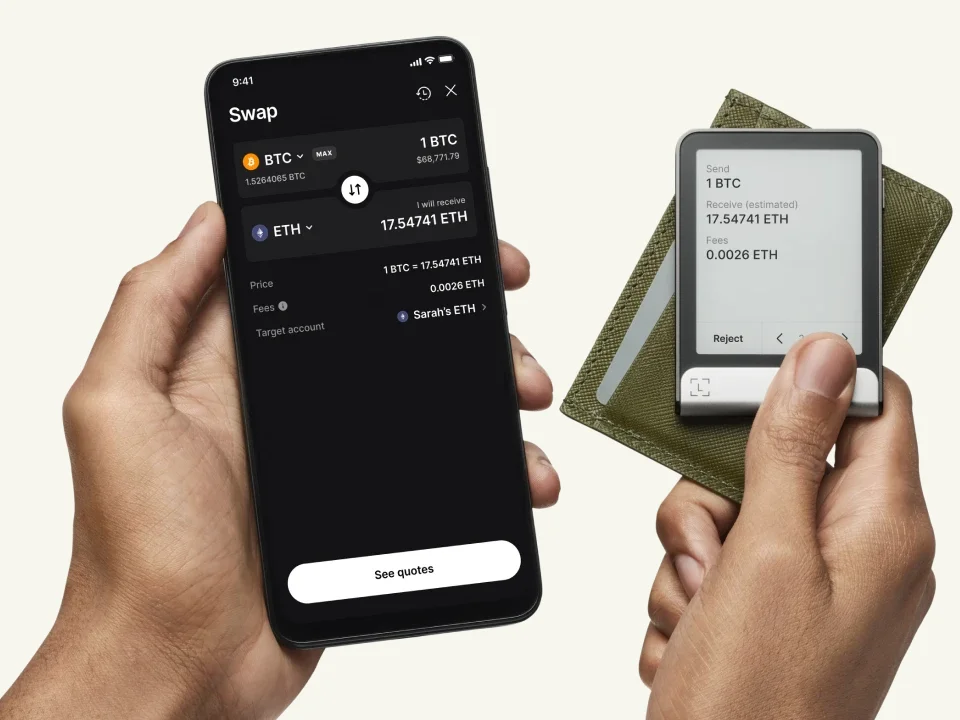
Manufacturer example of a swap review on Ledger Flex: the amount to send, estimated amount to receive and fee. These are example values, not a current quote.
For repeated PIN entry and transaction checks, Flex gives you more screen area; Safe 5 is the smaller device. Neither choice removes scrolling or checking the complete recipient and amount. A readable request can still ask you to approve something you did not intend.
The standard new Safe 5 setup uses a 20-word SLIP39 backup; a new Ledger wallet creates a 24-word BIP39 phrase. Flex’s documented manual restoration accepts BIP39, not that 20-word SLIP39 backup. If your existing Trezor wallet instead uses BIP39, the compatibility question is different: check its phrase length, accounts and any exact optional passphrase.
You can also create a new wallet on the replacement and transfer funds to its new addresses. Keep the original wallet usable until access and transfers are checked. Safe 5 has a separate Bitcoin-only edition; the comparison here uses its Universal edition alongside the multi-asset Flex.
Check compatible recovery formats
Restoring a wallet or creating a new one
Compare Ledger and Trezor beyond these two touchscreen models
Documentation checked October 5, 2026. This page is based on manufacturer documentation.
How we compareAt a glance
Keep comparing
Weighing up another pair?Compare any two or three wallets


