
Choose BitBox02
Your routine stays on USB with a computer or Android device. You do not need iPhone support and are comfortable reviewing details on the original OLED display.
Price at BitBox
Details Choose this edition at the store.


Choose Nova for iPhone use, allowing for Bluetooth pairing and a physical power connection. For computer or Android use, compare the display and controls you prefer; either model may fit.
Your routine stays on USB with a computer or Android device. You do not need iPhone support and are comfortable reviewing details on the original OLED display.
Choose this edition at the store.

You need iPhone signing or prefer Nova's glass-covered display. Allow for external power and Bluetooth pairing when using it with an iPhone.
Choose this edition at the store.
Nova works with BitBoxApp on iPhone over Bluetooth, while the phone or another suitable source supplies power through the physical connection. The original BitBox02 has no iPhone signing workflow: an iPhone’s USB-C socket does not change that.
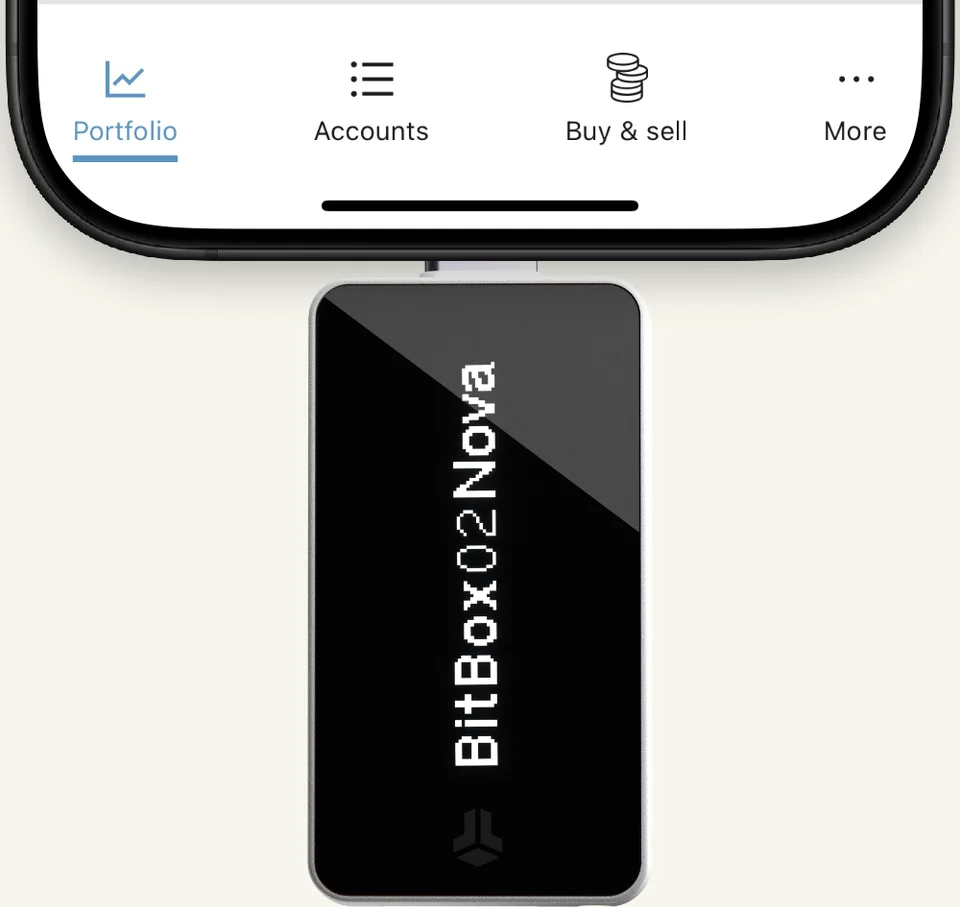
Manufacturer example: Nova takes power from the iPhone here. BitBoxApp exchanges data with the device over Bluetooth.
On Android, both models use USB and require USB OTG, which lets the phone communicate with an external device. Nova’s Bluetooth support is for iPhone and iPad, not Android.
Both connect by USB, show transaction details on an OLED display and use touch-sensitive edges. Nova adds a glass-covered display; it does not turn the device into a touchscreen. You still review the address and amount on the wallet.
If your original BitBox02 works with your computer and you can comfortably read and operate it, USB use alone gives you no reason to replace it. Nova is a more concrete upgrade when you need iPhone signing or prefer its glass-covered screen.
Both generations have fixed Multi and Bitcoin-only editions. Choose the device for your phone or computer, then the edition for your assets. A Multi edition cannot later become a Bitcoin-only device, or the reverse.
An existing BitBox backup can restore the same wallet on a compatible replacement. Preserve the microSD backup or recovery words and any exact optional passphrase; the new edition and app must also support the accounts you need. If you instead create a new wallet, transfer to its new addresses before retiring the old setup.
Which editions let you change the firmware?
Documentation checked October 5, 2026. This page is based on manufacturer documentation.
How we compareAt a glance
Keep comparing
Weighing up another pair?Compare any two or three wallets


