

The card and the wallet backup do different jobs
With microSD protection enabled, the card holds a separate secret used to unlock Model T. It does not hold your recovery words. Copying the card is therefore not a substitute for keeping the wallet backup.
Your wallet backup restores the wallet after the device is lost, damaged or reset. If you use a passphrase wallet, you also need the exact passphrase. Someone with that backup and passphrase can restore the wallet elsewhere without your microSD card.
Inserting a card does not enable protection
This is an optional advanced feature. To set it up, you need a computer, Trezor’s command-line tool, trezorctl, and a FAT32-formatted microSD card. It is not an ordinary backup saved by inserting a card into the slot.
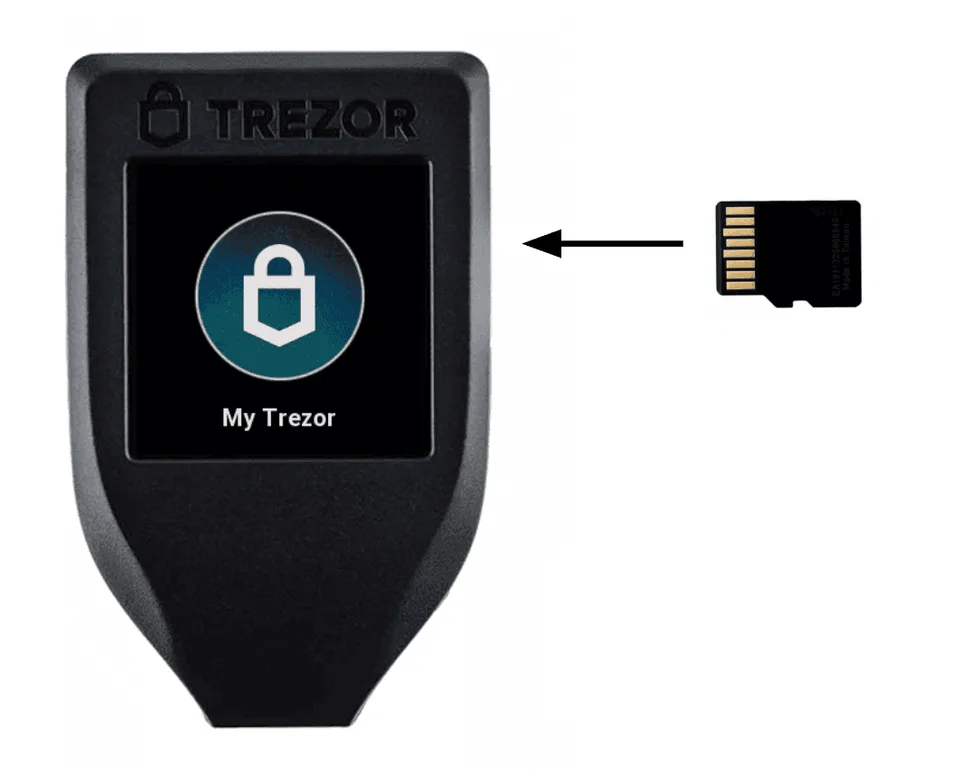
The Model T card slot accepts a microSD card. Protection must be enabled separately; inserting a card alone does not configure it.
Once protection is enabled, you need the paired card each time you unlock the device. To keep the card out of the hands of someone who takes the device, store them in separate places when not in use. Before changing this setup, make sure your wallet backup and any passphrase are available.
Follow the maintained manufacturer procedure for enabling, disabling or changing card protection. Formatting a card erases its existing contents; do not treat a formatting prompt as a harmless confirmation.
Manufacturer support
If the paired card is lost or damaged
The configured device cannot be unlocked normally without its paired card. A valid wallet backup can instead restore the wallet on a compatible device. For a multi-share backup, you need enough shares to meet the threshold you chose; a passphrase wallet also needs the same passphrase.
Check that you have this recovery information before resetting anything. If it is missing too, keep the device as it is. Open Trezor’s support page below and choose “Contact our support” to explain the problem. Never send support your recovery words or passphrase. A new microSD card cannot recreate the missing secret or replace the wallet backup.
The linked Model T recovery procedure is for a new or reset Model T. If you use a different compatible replacement, follow its manufacturer’s recovery instructions instead.
Check which recovery format your replacement must support
Manufacturer support