A good fit if
You want a compact device for Bitcoin with both connected and camera-based workflows. You are willing to choose how to unlock it and understand what must be available each time you use it.


The camera-equipped Jade for people who want QR workflows alongside USB and Bluetooth options.

Approve transactions with
Controls
Physical buttons
Backup
Recovery phrase
Power
Rechargeable battery
Is it right for you?
You want a compact device for Bitcoin with both connected and camera-based workflows. You are willing to choose how to unlock it and understand what must be available each time you use it.
You want one device for Ethereum and other unrelated networks, or expect scanning QR codes to remove every online dependency. Jade’s PIN unlock and its transaction-signing connection are separate choices.
A simpler USB workflow if you prefer a conventional device PIN and guided setup in Trezor Suite.
Compare Jade Plus and Safe 3A larger screen and physical keyboard for Bitcoin workflows, if you accept its setup requirements and current manufacturer advisory.
Compare Jade Plus and COLDCARD QA touchscreen and Bluetooth workflow in Ledger Wallet, with a different device-unlocking model.
Compare Jade Plus and FlexPhones and computers
Check the app and connection for each device. Setup and transaction signing are confirmed separately.
USB or Bluetooth
This workflow uses Bitcoin mainnet in the Blockstream app. The standard firmware also supports Liquid, so it is not Bitcoin-only.
USB
Windows · macOS · Linux
This workflow uses Bitcoin mainnet in the Blockstream app. The standard firmware also supports Liquid, so it is not Bitcoin-only.
QR
Webcam required for QRWindows · macOS · Linux
Prepare Jade QR mode and use a webcam with Sparrow. QR signing supports Bitcoin, not Liquid.
Bluetooth
This workflow uses Bitcoin mainnet in the Blockstream app. The standard firmware also supports Liquid, so it is not Bitcoin-only.
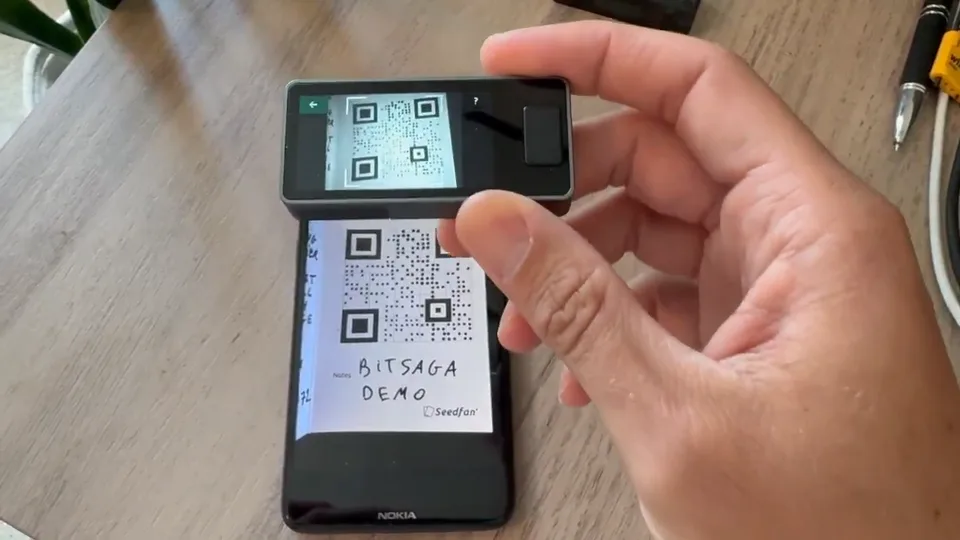
Jade Plus can exchange transaction data with a compatible app over USB, Bluetooth or QR codes. In QR mode, the app prepares a Bitcoin transaction, Jade scans it for your review and signature, and the same app scans the signed result and broadcasts it. Sparrow is one documented option for this QR workflow.
Check the recipient and amount on Jade before approving. The camera transfers data; it does not decide whether the payment is the one you intended. QR mode supports Bitcoin transactions, not Liquid. For Liquid assets, use the Blockstream app over USB or Bluetooth with compatible firmware.
In a PIN-based setup, Jade keeps encrypted wallet data on the device. Your PIN works together with a device secret and a secret from a PIN service, called a blind oracle. A companion app relays the exchange needed to unlock it; the service does not receive your recovery phrase or PIN.
QR PIN Unlock carries that exchange through scans with an online companion page. It avoids a USB or Bluetooth data connection to Jade, but it still needs the PIN service. Plan for this before choosing it as your everyday routine. Running your own oracle is an advanced alternative, not a required setup step.
Official guidance
A SeedQR encodes your recovery phrase. In the temporary-signer workflow, Jade scans it to load your keys for the session and forgets the wallet on reboot. This avoids the PIN-service exchange. You load the keys again for each session, either by scanning the SeedQR or entering the same recovery words on Jade.
Protect it like the written recovery phrase: do not photograph it with your phone or confuse it with a QR code that is safe to show a payment app. Keep the exact optional passphrase as well if you use one. Losing the device and losing your recovery information are different problems; a new Jade cannot recreate missing secrets.
| Detail | Value |
|---|---|
| DisplayDisplay type | LCD |
| Screen diagonal | 1.9″ |
| Resolution | 320 × 170 px |
| Colour mode | Colour |
| Size and weightDimensions | 65 × 30 × 12 mmDimensions as listed by the manufacturer |
| Power and chargingBattery | Rechargeable |
| Battery capacity | 280 mAh |
| Charging methods | USB-C |
| Device connectionsUSB port | USB-C |
| Security and softwareSecurity chip | No Secure Element |
This page is based on manufacturer documentation.
Documentation checked: · ·
How we compareBlockstream Jade Plus


