A good fit if
You want a button-operated Bitcoin wallet for the Blockstream app on your phone or computer. Core fits if you are happy to keep it powered by USB and use an online PIN service for everyday unlocking.


The entry-level Jade model for using Bitcoin with the Blockstream app on a phone or computer.

Approve transactions with
Controls
Physical buttons
Backup
Recovery phrase
Power
USB power
Is it right for you?
You want a button-operated Bitcoin wallet for the Blockstream app on your phone or computer. Core fits if you are happy to keep it powered by USB and use an online PIN service for everyday unlocking.
You want a battery-powered device or camera-based QR signing, or you want everyday PIN unlocking without an online service. Core has neither a battery nor a camera; Bluetooth carries data but does not power it.
The original compact Jade if you want Bitcoin QR signing with a compatible app and accept its wheel and button controls.
Compare Jade Core and Jade ClassicA camera-equipped Jade if you want Bitcoin QR signing alongside USB and Bluetooth connections.
Compare Jade Core and Jade PlusChoose it if you prefer Trezor Suite for guided setup and checking your backup, and plan to use USB on a computer or Android phone.
Compare Jade Core and Safe 3Phones and computers
Check the app and connection for each device. Setup and transaction signing are confirmed separately.
Bluetooth
This workflow uses Bitcoin mainnet in the Blockstream app. The standard firmware also supports Liquid, so it is not Bitcoin-only.
USB
Windows · macOS · Linux
This workflow uses Bitcoin mainnet in the Blockstream app. The standard firmware also supports Liquid, so it is not Bitcoin-only.
USB or Bluetooth
This workflow uses Bitcoin mainnet in the Blockstream app. The standard firmware also supports Liquid, so it is not Bitcoin-only.
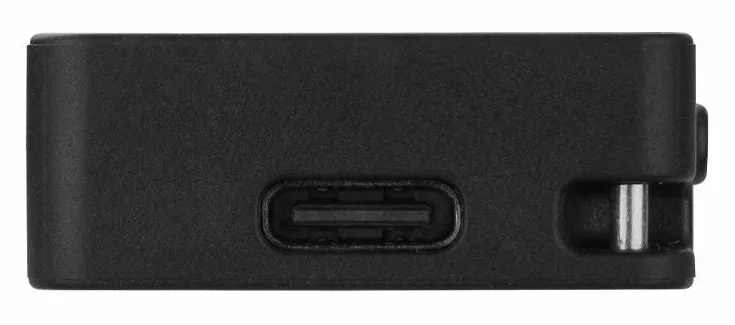
Keep Jade Core plugged into USB-C while you use it: it has no battery. On a computer, USB carries both power and data. With an iPhone, the Blockstream app exchanges data over Bluetooth while USB supplies power. Android can use Bluetooth or USB with the Blockstream app.
Core has physical buttons and a display for checking requests. It has no camera for QR signing. Choose a camera-equipped Jade if that is the workflow you want.
When you save a wallet on Core with a PIN, the device stores encrypted wallet data. Unlocking combines your PIN, a secret on the device and a secret from Blockstream’s PIN service, called a blind oracle. The companion app needs an online connection to relay that exchange. The service does not receive your PIN or recovery phrase.
For everyday PIN unlocking, plan to have the companion app online and able to reach the service. Three incorrect PIN entries require restoring the wallet from its recovery phrase. Keep the written backup independently of the device.
Get the official Blockstream app, then follow its Jade setup instructions. For a new wallet, the recovery words are created on Core; connecting the hardware wallet does not require importing those words into the phone or computer app.
Official guidance
To receive Bitcoin, open your Jade wallet in the Blockstream app and choose Receive. Select Verify on Device, then compare the address shown on Core with the app’s address before sharing it with the sender. For an exchange withdrawal, the sending network must match the receiving account.
To send, enter the recipient, amount and fee in the app. Core then shows the payment for your approval: compare the address and amount with what you intended, selecting the address field to see it in full. After you approve, Core returns the signed transaction to the app, which broadcasts it. Device approval and network confirmation are separate stages.
If Core is lost, damaged or needs restoration after incorrect PIN attempts, recovery depends on your written phrase. Blockstream documents manual entry of a compatible recovery phrase through Restore Wallet. If you used an optional passphrase, you also need that exact passphrase: changing it opens a different wallet, and Jade does not store it.
While the wallet still works, Blockstream’s Temporary Signer procedure lets you check the written backup without overwriting the PIN-saved wallet. First record the saved wallet’s 8-character fingerprint. Read the official procedure, enter the same recovery words manually on Core and use the exact passphrase if you had one, then compare the fingerprint. A matching fingerprint is Blockstream’s check that the entered backup matches the PIN-saved wallet. Temporary Signer forgets the loaded wallet when Core turns off; keep the recovery backup.
Before recovering a wallet from another device, check the recovery format and the account requirements. Creating a new wallet gives you a new backup and receiving addresses; it does not restore the old wallet.
Official guidance
On desktop, connect Core by USB and follow the Blockstream app’s firmware prompt. On mobile, the prompt appears after initial setup; iPhone uses Bluetooth for data. If the wallet is already in use, have the written recovery phrase and exact optional passphrase available before device changes, and follow the official update instructions.
The Bitcoin workflow described here uses the Blockstream app with standard Bitcoin/Liquid firmware, which is not limited to Bitcoin. No-Radio firmware removes Bluetooth support; it does not fit the iPhone connection described above. Before using another asset or network, check the installed firmware and the app’s support for that task.
Official guidance
| Detail | Value |
|---|---|
| DisplayColour mode | Sources disagreeBlockstream’s Jade lineup article describes a color display on Core; the Jade Plus store comparison says Core has no display. The sources conflict on Core’s display. |
| Size and weightDimensions | 65 × 30 × 12 mmDimensions as listed by the manufacturer |
| Device weight | 20 g |
| Power and chargingBattery | No battery |
| Operating power | USB power |
| Materials and finishMaterials | Body: Plastic |
| Device connectionsUSB port | USB-C |
| Security and softwareSecurity chip | No Secure Element |
This page is based on manufacturer documentation.
Documentation checked: · · · ·
How we compareBlockstream Jade Core


