A good fit if
Choose Ring if you want to carry a hardware wallet as a wearable, are comfortable taking it off to scan, and are happy to review payments on your phone. The supplied cards give you another way to use the same wallet.


A hardware wallet in a ring, with two cards for the same wallet. Use it with the Tangem app on a compatible NFC phone.

Approve transactions with
Controls
No controls on the wallet
Backup
Backup cards
Power
Powered by NFC
Is it right for you?
Choose Ring if you want to carry a hardware wallet as a wearable, are comfortable taking it off to scan, and are happy to review payments on your phone. The supplied cards give you another way to use the same wallet.
Choose Tangem Wallet if you prefer cards and do not need the wearable form. Choose Ledger Flex if you want to check payment details on a separate touchscreen while still using an iPhone or Android phone. Ring has no display of its own.
Choose the card format if carrying a ring adds no benefit. You still review payments on the phone and scan a device through NFC.
Compare Tangem Ring and Tangem WalletChoose Flex for a separate touchscreen to review transactions, with Bluetooth signing through Ledger Wallet on a compatible iPhone or Android phone.
Compare Tangem Ring and FlexPhones and computers
Check the app and connection for each device. Setup and transaction signing are confirmed separately.
NFC
You need a compatible NFC phone and supported versions of its operating system and wallet app. You check the transaction details on the phone.
NFC
You need a compatible NFC phone and supported versions of its operating system and wallet app. You check the transaction details on the phone.
Use the Tangem app on an iPhone or Android phone with NFC. The current iPhone app requires iOS 16.4 or later. Installing the app and having NFC are separate checks: the phone also needs full NFC support to link the backup devices during setup.
The minimum Android version for the current app is unconfirmed. Check that the app can be installed on your actual phone, and use Tangem’s scan guide to check its NFC limitations. Ring does not offer a computer signing workflow.
Use the hardware-wallet setup for Ring. The app also offers a separate Mobile Wallet mode, which holds its signing keys on the phone.
Official guidance
With seedless setup, the device creates the signing keys inside its chip. There are no recovery words to write down: your linked ring and cards are the backup. This suits you if you want to avoid keeping a written phrase, but losing every usable device means losing access.
If you want a written recovery option, choose the phrase mode during setup. The app generates a 12- or 24-word BIP39 recovery phrase on your phone and imports the resulting keys into the hardware. BIP39 is a recovery-phrase format used by compatible wallets. You must record the words when they are shown; you cannot display them again later from the ring or cards.
You cannot reveal or add a recovery phrase for an existing seedless wallet. Moving to phrase mode means creating a new wallet, rather than switching on a setting for the old one.
The word counts below apply only to the optional phrase routes: creating a phrase or importing existing words.
Official guidance
The kit contains one ring and two Tangem cards. Once linked, each device can access and sign for the same wallet. A backup card is not restricted to emergency recovery: you can use it instead of the ring.
Add the devices you want in the linked set before finalizing the backup. Setup requires at least two devices and allows up to three; you cannot append the unused third device or a newly purchased replacement after finalization. Keep the linked devices in separate places so one loss does not take the whole set.
Each device must first be scanned once with the phone online for its certificate check. Setup and backup can then be completed offline. Take the ring off your finger to scan it, and hold it steady at the phone’s NFC area until the scan finishes. On iPhone that area is at the top; Android placement varies by model.
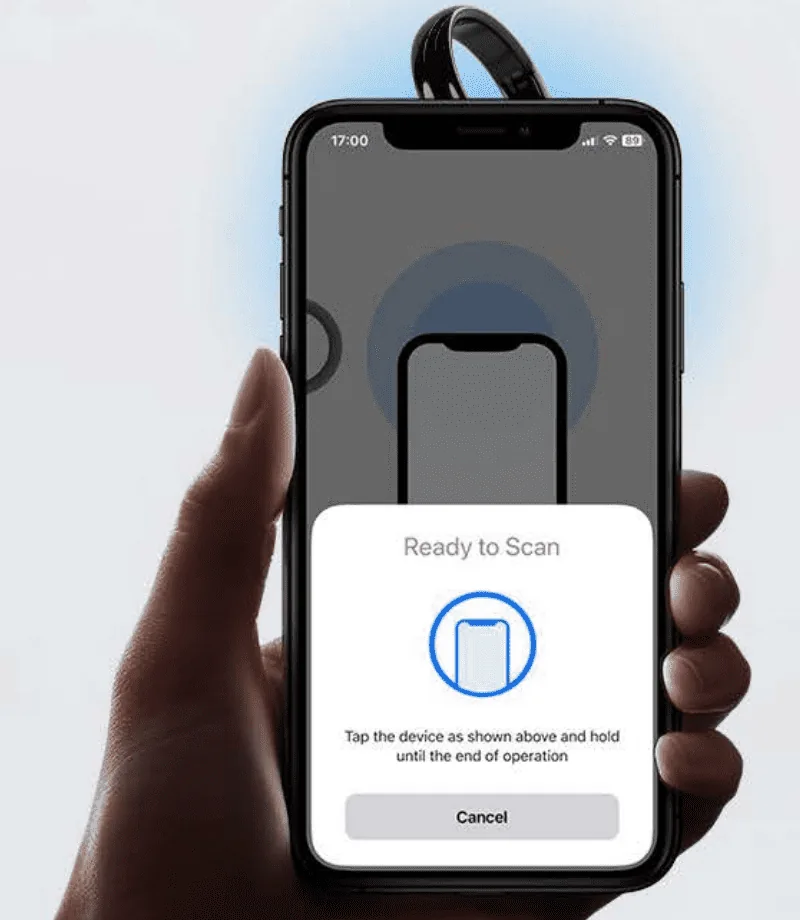
Prepare an ordinary transfer in the Tangem app: choose the asset and network, enter the recipient and amount, include any required memo or destination tag, and check the network fee. Review these details on the phone. The ring has no screen for independently checking the recipient or payment.
To confirm, enter the device’s access code or use permitted phone biometrics, then scan the linked ring or card when the app asks. Biometrics do not replace the physical scan. Remove the ring from your finger and keep it away from the phone while entering the code; hold it at the NFC area only while the scan window is active.
The hardware signs the transaction, and the app sends it to the network. Network confirmation comes afterward. A completed scan is not a promise that the payment has already reached its destination.
Bitcoin and Ethereum are supported with the Tangem app on iPhone and Android. To receive, select the intended asset in the app, open Receive and copy or share the address. The sending network must match the receiving account; a token name alone does not identify its network.
The ring has no display for checking that receiving address. An ordinary incoming transfer does not require scanning the ring or leaving it next to the phone. Before choosing Ring for another coin or token, check support for that exact asset and network.
Official guidance
Ring can import an existing 12-, 15-, 18-, 21- or 24-word BIP39 phrase through the phone app. If the original wallet used a passphrase, you need that exact passphrase during import too. It is separate from the access code used to unlock a Tangem device.
The right phrase length does not guarantee that every original account will appear. The asset, network, address type and account path also need to be supported. Alternatively, create a new Ring wallet and transfer funds to its receiving address; that moves the funds without reusing the old phrase.
Official guidance
You enter the device access code in the Tangem app. Setup initially gives the linked devices the same code, but each stores its own: changing one device’s code does not change the others. Optional phone biometrics let the app store the code encrypted on the phone and fill it for you; the ring has no biometric reader.
If Require Access Code is enabled in the app, sensitive actions require the code even when you use biometrics to unlock the app. Scanning a linked device is still required for signing in either case.
If you forget a device’s code, recovering it requires that device plus another linked device from the same wallet. Recovery must be enabled on the device you are recovering and on the helper. A device with code recovery disabled cannot have its code recovered or help recover another device’s code.
Official guidance
If the phone is lost or broken, install the app on another compatible phone and scan a remaining linked device using its access code. The old phone’s biometric access is not a replacement for knowing that code.
If the ring or a card is lost, you can still use another linked device with its access credentials. The lost device cannot be remotely blocked, and a replacement cannot be added to the finalized set. Moving funds to a newly created wallet is a separate step from replacing a backup.
If every device in a seedless set is lost or unusable, there is no recovery phrase to restore it. With a phrase-enabled wallet, the words you preserved can restore access on a compatible replacement, together with the original passphrase if you used one and support for the original accounts and networks. Words you never saved cannot be retrieved afterward.
Official guidance
Use Tangem’s sizing guidance to choose your size before ordering. Tangem lists US sizes 6–13 and a band width of 7.8–8 mm. Check the return conditions before activating the set: Tangem’s standard returns apply to unused, unactivated devices.
The ring has no battery, cable or charger. Tangem lists a ceramic shell and an IP69K rating.
The hardware firmware cannot be updated. Keep the Tangem phone app up to date; updating the app does not change the firmware in the ring or cards.
Official guidance
| Detail | Value |
|---|---|
| Power and chargingBattery | No battery |
| Operating power | Powered by NFC |
| Materials and finishMaterials | Casing: Zirconia ceramic |
| Security and softwareSecurity chip | CC EAL6+ |
| ProtectionDust and water protection | IP69K |
This page is based on manufacturer documentation.
Documentation checked: · ·
How we compareTangem Ring

