A good fit if
You want a small button-operated wallet that connects to a phone over Bluetooth without needing USB power each time.


The button-operated OneKey with a battery, USB and Bluetooth for a conventional phone-and-computer setup.

Approve transactions with
Controls
Physical buttons
Backup
Recovery phrase
Power
Battery or USB power
Is it right for you?
You want a small button-operated wallet that connects to a phone over Bluetooth without needing USB power each time.
You want a large touchscreen for reviewing requests, or would prefer a device without a rechargeable battery.
Choose Pure if you prefer external USB power to a built-in battery.
Compare Classic 1S and Classic 1S PureChoose Pro 2 for an AMOLED touchscreen and fingerprint access instead of Classic 1S’s buttons.
Compare Classic 1S and Pro 2Choose the original Pro for touchscreen controls and the option to switch the same device to Bitcoin-only firmware.
Compare Classic 1S and OneKey ProPhones and computers
Check the app and connection for each device. Setup and transaction signing are confirmed separately.
Bluetooth
USB
Windows · macOS · Linux
Bluetooth
Windows · macOS
Use an initialized, unlocked Classic 1S with current compatible OneKey desktop app and firmware for the selected mode. Enable Bluetooth on the device, in the app and on your computer, with the required permissions. Disconnect USB: the cable takes priority. Initial setup over desktop Bluetooth is unconfirmed. Bitcoin-only firmware signs only Bitcoin; Ethereum needs general firmware.
Bluetooth
Use Classic 1S’s four buttons to follow its screen prompts. If it already holds your wallet, connect it as a hardware wallet; do not create new keys or import its recovery words into the app.
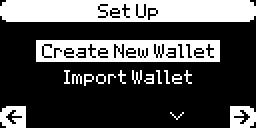
Use the steps below only if you have already created or restored a wallet on Classic 1S and can unlock it. For an uninitialized device, follow setup to choose Create New Wallet or Import Wallet.
For a phone Bluetooth problem, check the device’s Bluetooth setting and the app’s Bluetooth permission; Android troubleshooting also calls for location permission. For a computer USB problem, check the USB data connection; desktop gives a connected USB data cable priority. Follow the platform-specific troubleshooting instructions if the problem persists.
Choose Create New Wallet for new keys. To restore existing accounts on a new, uninitialized Classic 1S, choose Import Wallet instead. An initialized device needs reconnection, not another wallet.
Restoring an existing wallet? Follow the recovery route before choosing Create New Wallet.
Get OneKey App from its official download before installing it.
Do not photograph recovery words, save them in cloud notes or enter them into OneKey App.
Official guidance
Choose the exact asset and receiving network. Classic 1S needs general firmware for Ethereum, Solana and other non-Bitcoin networks; Bitcoin-only firmware restricts it to Bitcoin. An app listing alone does not establish hardware support.
For another asset or custom network, check support for Classic 1S and the operation first.
Check receiving instructions, including a required reference or minimum deposit.
Get current receiving details from the official Receive/Deposit page or the recipient through a trusted channel. If you intend an ordinary transfer, reject a token spending permission. Reject any unexpected or unexplained request before approving.
Firmware parsing cannot make every request readable. App warnings do not replace hardware review.
App requirements
Official guidance
Classic 1S can compare your written phrase with its stored phrase without erasing the wallet. This procedure is documented for release 3.20.0. You need the main PIN and Check Recovery Phrase already in your device’s menu.
A match confirms the stored phrase agrees. A valid but different phrase is the wrong backup for this device. An invalid phrase needs checking for incorrect words, order or count.
This does not verify a passphrase, funded account or replacement wallet’s compatibility. Do not update solely to obtain the checker while recovery information is uncertain.
Keep the exact passphrase before funding a hidden wallet. You need it again after restoring the recovery phrase; a different spelling opens different accounts. Store it securely, separately from the phrase.
For the documented desktop route, enable Passphrase in Security and connect by USB. In OneKey App’s account-name menu, select the device → Edit → Add hidden wallet. Enter and confirm the passphrase in the app, check and confirm it on Classic 1S, then finish with Done. The limit is 50 characters from ASCII 32–126; check the guide before using unfamiliar symbols.
Classic 1S can bind up to three hidden wallets to separate PINs from firmware 3.14.0. Binding requires the main PIN; follow the official guide and your device’s displayed controls.
Reopen the exact hidden wallet before checking its original asset, network and account. A third-party app must support passphrases; an empty account does not prove the funds disappeared.
To restore Classic 1S, you need the complete recovery phrase and exact passphrase if used. A PIN or displayed balance cannot replace them.
Restoring keys does not transfer coins. If an expected account is absent, check the passphrase and account selection before creating another wallet or sending.
Forgotten PIN? Stop guessing. Current Classic guidance says five consecutive incorrect entries reset the device; older instructions say ten. Do not rely on extra attempts. Without a usable backup or another device that can authorize, reinstalling the app cannot recreate keys.
Reset erases wallet data; it is not a backup test. The non-destructive checker requires your main PIN and an existing menu. Reset only with established recovery information; an old app pairing may need removal before reconnecting. Never send the phrase or passphrase to support.
Establish the correct recovery phrase and exact optional passphrase before updating. A hardware firmware update is separate from updating OneKey App.
If the checker is usable, compare your written phrase before maintenance.
If the App firmware update stalls at 90–95% and restarts, OneKey recommends its firmware website. The official procedure supplies that route. Do not reset to clear an update error.
If that route also fails, give support the model and error, never recovery words.
Classic 1S is sold here as the standard model. Its installed firmware can be general or Bitcoin-only; this is not another store edition. Switching does not convert or transfer coins on other networks.
Reopen any passphrase wallet before checking restored accounts.
To return, use Device management → Switch to Universal and the official route below. Re-import the phrase on the device and reconnect. Reopen the exact passphrase wallet if used, then check the original assets, networks and accounts.
Official guidance
For long storage, OneKey recommends about 40–60% charge in a cool, dry place, away from prolonged heat. This is manufacturer care advice, not a measured lifetime. Classic 1S can use USB power for important operations as its battery ages.
If the screen stays dark or shows an error, connect Classic 1S to a computer with a USB data cable and check whether OneKey App detects the hardware. A cached balance does not show that the device can approve payments.
For a dark screen, the official guide distinguishes detected from undetected hardware; an error screen has a different procedure. Give support your model, symptom and connection checks.
Official guidance
| Detail | Value |
|---|---|
| DisplayDisplay type | OLED |
| Screen diagonal | 1.54″ |
| Resolution | 128 × 64 px |
| Colour mode | Monochrome |
| Size and weightDimensions | 86 × 52 × 5.2 mmDimensions as listed by the manufacturer |
| Device weight | 20.5 g |
| Power and chargingBattery | Rechargeable |
| Battery chemistry | Lithium-ion polymer |
| Battery capacity | 110 mAh |
| Nominal voltage | 3.7 V |
| Capacity after charge cycles | At least 300 charge cycles with at least 80% capacity remaining |
| Storage while switched off | Can still power on after approximately 7 months stored switched off, starting fully chargedTypical manufacturer laboratory results. Performance varies with temperature, usage, and self-discharge. For long-term storage, keep the device in a cool, dry place at 40–60% charge. |
| Operating power | Battery or USB power |
| Compatible USB charging input | 5 V / 2 A |
| Charging methods | USB-C |
| Materials and finishMaterials | PC/ABS |
| Device connectionsUSB port | USB-C |
| Security and softwareSecurity chip | CC EAL6+ |
| Operating conditionsOperating temperature | 0 °C … 45 °C |
| Storage temperature | -20 °C … 30 °C |
FIDO2 · U2F
Requires Universal firmware
FIDO2: Requires OneKey Classic 1S firmware 3.11.0 or later
USB only for registration and sign-in
This page is based on manufacturer documentation.
Documentation checked: · · · · · ·
How we compareOneKey Classic 1S


