A good fit if
You want a touchscreen in the Nano range and Bluetooth for use with an iPhone. A monochrome display suits you, and you are willing to keep the battery charged.


The Nano generation with an E Ink touchscreen and Bluetooth, distinct from the older button-operated Nanos.

Approve transactions with
Backup
Recovery phrase
Power
Rechargeable battery
Is it right for you?
You want a touchscreen in the Nano range and Bluetooth for use with an iPhone. A monochrome display suits you, and you are willing to keep the battery charged.
You prefer physical buttons, want a higher-resolution grayscale display, or need wireless charging. Nano Gen5 charges by USB-C; Bluetooth does not charge it.
A 2.8-inch E Ink touchscreen with higher resolution and grayscale, if those display differences matter to you.
Compare Nano Gen5 and FlexA larger curved E Ink touchscreen and Qi charging, if you want those features beyond Gen5’s USB charging.
Compare Nano Gen5 and StaxA smaller device with physical buttons and Bluetooth phone use, if you prefer buttons to touch controls.
Compare Nano Gen5 and Nano XPhones and computers
Check the app and connection for each device. Setup and transaction signing are confirmed separately.
USB
Linux
Bluetooth
USB or Bluetooth
Nano Gen5 has a 2.8-inch monochrome E Ink touchscreen. Unlike Nano X and Nano S Plus, it uses touch controls to review and approve requests. Prepare the payment in a wallet app, then read the recipient, amount and fee on Gen5 before confirming.
An app may also ask for permission to spend tokens rather than a simple payment. Read the request the device actually shows; a touchscreen does not make an unfamiliar app trustworthy or ensure every request can be displayed clearly.
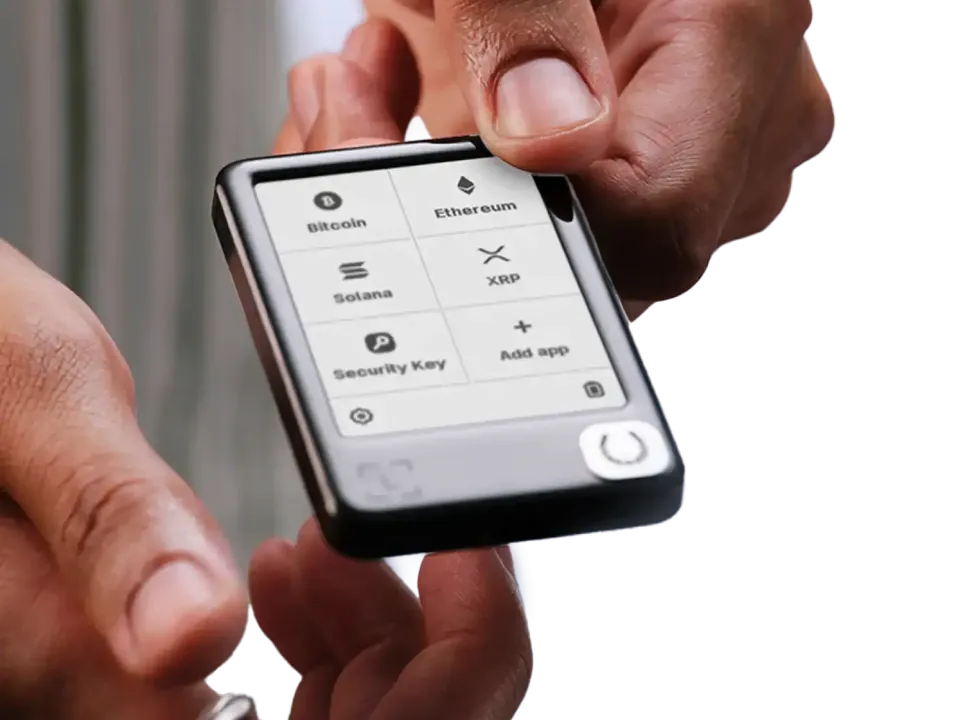
With Ledger Wallet on Android, you can connect Gen5 by Bluetooth or a USB data cable. On a supported computer, use Ledger Wallet over USB. Cryptocurrency support depends on the wallet app and network, so another compatible app may be needed for a particular asset.
For desktop use with Gen5, you need a 64-bit computer and a display resolution of at least 1024 × 768. Gen5 is not compatible with Chromebooks. Ledger Wallet is not compatible with Surface Pro, and Ledger does not support the app on iPad or other tablets.
The battery charges through USB-C. Gen5 does not support Qi wireless charging.
A new Gen5 wallet gives you a 24-word recovery phrase to write down in order. To restore an existing compatible wallet, choose recovery during setup and enter its words on Gen5’s touchscreen. Do not enter them in Ledger Wallet or a website.
Ledger Recovery Key is an optional, PIN-protected card for backing up a 24-word recovery phrase. The listed offer includes a card, but you must configure it before it can restore your wallet. To restore with it, you need the card’s PIN. Ledger’s instructions require the current Ledger OS and NFC enabled on the device. Keep your written phrase as a fallback.
The card does not save an additional passphrase. If you used one for your accounts, you still need that exact passphrase. Recovery Key is separate from the optional Ledger Recover subscription; neither is required to use Gen5 with a written recovery phrase.
| Detail | Value |
|---|---|
| DisplayDisplay type | E Ink |
| Screen diagonal | 2.8″ |
| Resolution | 300 × 400 px |
| Colour mode | Monochrome |
| MemoryStorage space | 1.5 MB |
| Size and weightDimensions | 79.4 × 53.35 × 8.64 mmDimensions as listed by the manufacturer |
| Device weight | 46 g |
| Power and chargingBattery | Rechargeable |
| Battery life | Up to 10 hrUsage conditions not stated |
| Charging methods | USB-C |
| Wireless charging | Not supported |
| Materials and finishMaterials | Plastic |
| Device connectionsUSB port | USB-C |
| Bluetooth version | 5.2 |
| NFC functions | Ledger Recovery Key · Ledger Security Key |
| Security and softwareSecurity chip | ST33K1M5 · CC EAL6+ |
| Device software | Ledger OS |
FIDO2 · U2F
Required device app: Security Key
USB or NFC for registration and sign-in
For iPhone sign-in, use NFC with Chrome, Safari, or Firefox; the phone needs NFC.
Ledger lists Chrome on Android 14, with the Google Play system update dated March 1, 2024 or later. Firefox on Android is unsupported.
Passkeys stored on the key (resident or discoverable credentials) are not supported.
A compatible service and browser are required.
The device must also be registered as a security key with the website; installing the app alone does not register it.
Credentials from the older Ledger FIDO U2F app do not work with the Security Key app. Register the device as a new security key while keeping another working sign-in method.
Ledger documents restoring the Security Key app’s credentials on a new or reset Ledger set up with the same 24 recovery words. This does not cover resident credentials.
Keep another working sign-in method before relying on recovery.
Contents of this offer
Ledger Nano Gen5This page is based on manufacturer documentation.
Documentation checked: · · · · · ·
How we compareLedger Nano Gen5
Not sure yet? All 50 current wallets


